

This is a div block with a Webflow interaction that will be triggered when the heading is in the view.
- One tactic for doing this is warming up a mailbox.
- Let’s say that you have an email that has a poor deliverability rate but you need to send your newsletter from it, and you only have a week from the sending date.
- There are loads of companies that use Microsoft Outlook, so if you’re willing to target companies that use it then you can send away.
- However, consider that your deliverability rate is at risk because if enough Outlook addresses mark you as spam, then you can be booted from there as well.

The quest to achieve stable email deliverability is a noble one, and it’s done by thousands of sales reps and marketers on a daily basis.
One tactic for doing this is warming up a mailbox.
Many readers of this blog may have heard of mailbox warming. Some who are familiar with it might wonder: should I use an automatic tool to warm my mailboxes?
Read on to learn more about mailbox warming, why we need it, and the pros and cons of doing it manually versus automatically.
What Is Mailbox Warming & Why Do We Need It?
Warming a mailbox is the process of placing your email deliverability in a comfortable place. For sales reps and growth marketers who use email as a lead generation channel, having smooth deliverability is a holy grail waiting to be found.
Fortunately, mailbox warming is a method that can help you get there.
Let’s say that you have an email that has a poor deliverability rate but you need to send your newsletter from it, and you only have a week from the sending date.
What are you going to do?
Identify any language in your content that appears “spammy” and remove it. Send emails to contacts you know who will respond and mark as not spam. Do that once or more a day until your deliverability rate increased and ESPs take you off their spam list.

That’s exactly what warming your mailbox is.
To start the warming process, check the health of your mailboxes to see where they’re at.
As a side note, it’s recommended that you constantly check the health of your mailboxes - even if you don’t plan on warming them up.
You won’t know if what you’re sending is being delivered or not unless you check the health of your mailboxes weekly or more frequently.
If you are warming your mailboxes, then you won’t know if your warming process is working unless you test, too.
Test providers also show you which email service providers you’re hitting or not delivering.
For example, this mailbox is not delivering to G Suite but is to 42% of Outlook addresses. What can we do with that information

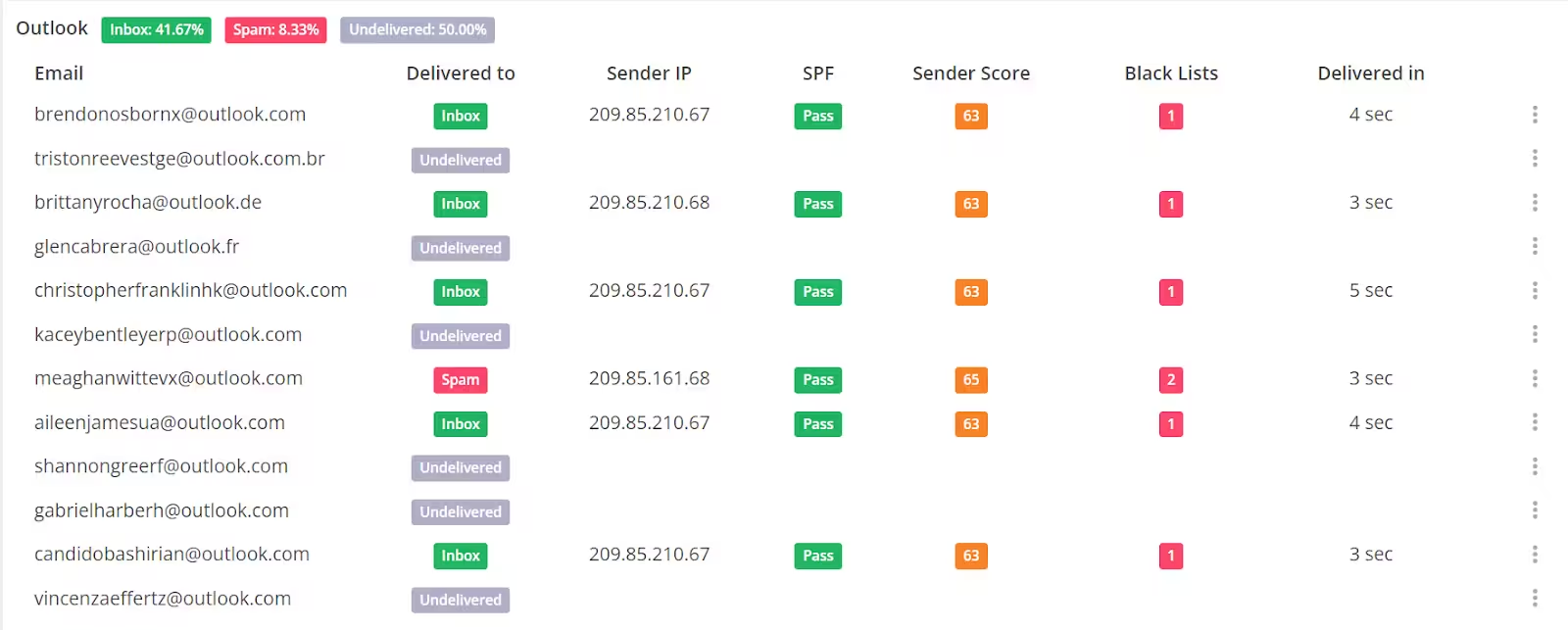
Screenshots provided by the author, GlockApps.
There are loads of companies that use Microsoft Outlook, so if you’re willing to target companies that use it then you can send away. However, consider that your deliverability rate is at risk because if enough Outlook addresses mark you as spam, then you can be booted from there as well.
If your target market is heavily on G Suite, then we have no choice but to warm the mailbox before we send to our lists.
In this situation, I would warm the mailbox. Thankfully, tests helped us guide our strategy.

Is warming your mailbox the only way to improve your email deliverability?
Not necessarily
Email deliverability is composed “of three parts…identification, reputation, [and] content.”
Identification “defines the set of protocols that prove you are who you say you are when you send an email, such as Sender Policy Framework (SPF), DomainKeys Identified Mail (DKIM), and Domain-Based Message Authentication, Reporting, and Conformance (DMARC).” If you can’t pass through those protocols, then warming your mailbox won’t be effective.
Reputation measures your trustworthiness. If your sender score, which measures your reputation, is low, then your emails could be marked as spam.
As for content, you need to not have spammy language or poor formatting. You don’t want your emails to be phishy!
But if you’ve already done everything - added your SPF record to domain provider, made your content passable, etc - then warming your mailbox is the only thing you can do.
Why Go Automatic?
These days, several tools have rolled out that warm your mailbox automatically. They connect to your email address, send a certain number of emails a day from your account, and have email addresses responding to your mailbox. Their addresses also send you messages and the tool automatically responds to them.
Automatic tools have reduced the headache of manually warming your mailbox. Yet do they work as promised? Are their tactics equally effective to your manual work?
There isn’t much data supporting this other than customer testimonials.
Even without evidence, reducing the headache of manually warming mailboxes might be a value add to your organization. When doing manual warm-ups, you have to check a lot of boxes: all the emails in your warm list are active, all spammy words are rid of, etc.
You also need to make sure that the people you are warming your mailbox with will actually respond to your messages. This means having a group of people who have addresses on varying domains to respond to your messages. You might already have people in mind to do this with you. But if you don’t, then that’s another hoop to jump through.
If you think that avoiding this process is worth it, then automatic tools are fit for you.
Manually warming mailboxes is a free but labor-intensive process. Automatically warming mailboxes is free of labor yet can get costly.
Conclusion
Warming up your mailbox is an effective way to improve email deliverability. The pros and cons of doing so manually or automatically are clear, and both methods can help you a lot. Whichever one you do is your choice to make.
Note: The writer is not affiliated with any external sources, except for SalesPipe and FoundCopy.