
This is a div block with a Webflow interaction that will be triggered when the heading is in the view.
- Presents 5 email hacks that make work much easier.
- Luckily, today there are new applications and strategies that help you conquer the stress of your inbox.
- Once you deal with the emails that matter, you can get to your tasks with peace of mind.
- Fortunately, now you can communicate via email with apps that feel like chat.

Keeping up with your inbox can feel like an impossible task. Especially, when you’d rather be spending your time being productive to reach and exceed project deadlines.
Mckinsey analysis reported that 28% of your workday is spent on checking emails. Spending too much time keeping up with your inbox multiple times throughout the day can become stressful, exhausting, and extremely time-consuming. Luckily, today there are new applications and strategies that help you conquer the stress of your inbox.
Check out these top 5 hacks for entrepreneurs and businesses that make email not only simple but also extremely useful:
1. Mark your urgent emails and answer these first
Respond to the emails that matter. Mark all the urgent emails and top priority contacts in your inbox and set aside a specific amount of “inbox time” each day to concentrate on them. Once you deal with the emails that matter, you can get to your tasks with peace of mind. This will also ensure you don’t miss any important correspondences, like replying to a follow-up email after an interview or responding to a prospect who's interested in what you do.
2. Snooze less urgent emails for later
Instead of leaving emails on read, snooze your less urgent emails for later. Snoozing your emails makes them show up at a later time and allows you to put it out of mind till it’s needed. Leaving you to concentrate on your higher priority work without the distraction of outstanding things you have yet to get to. It also allows you to not forget to get back to these emails.
In other words, you’ll be able to focus on important tasks and not be stressed about remembering to respond to unreplied open emails—the email notification will remind you to respond at a time more suitable in your schedule.
3. Use Spike to transform your email into chat
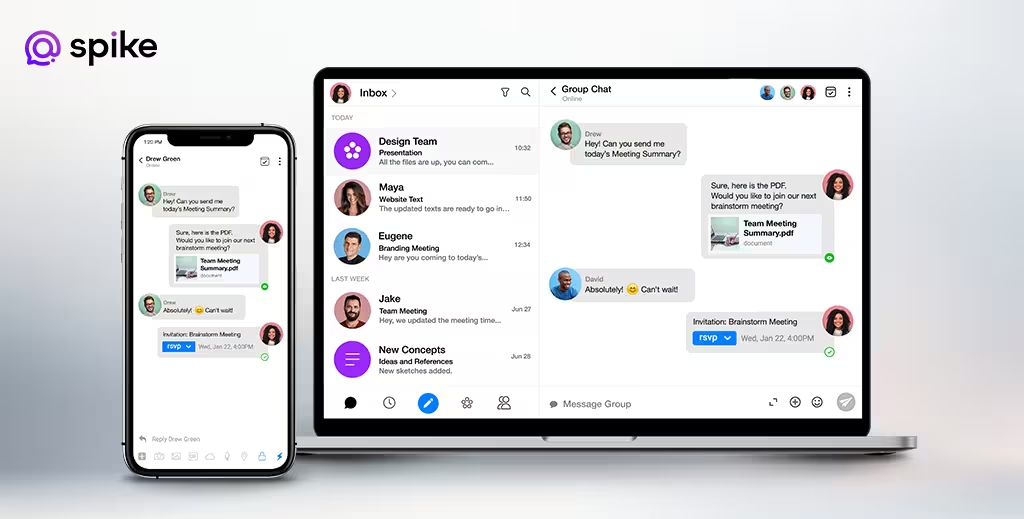
Transforming your email into chat is a super easy, quick, and organized way to answer your emails. Despite the increasing popularity of messengers, chat apps, and social media, email has managed to remain essential to digital communication and continues to grow each year. According to Statistia, the number of global emails are expected to reach 4.6 billion by 2025, which is around a six hundred thousand increase in users (4B) from 2020.
That being said, most people prefer to communicate by chat or messengers, since it is a quicker and more comfortable way to communicate. Fortunately, now you can communicate via email with apps that feel like chat. Download apps like Spike and automatically transform any of your existing emails into a chat-like inbox that makes sending an email feel like you’re sending a text.
4. Create a template for email replies

Most of the emails we are sending follow similar themes. “Hope all is well” and “please let me know” are lines usually found in many of our emails.
If you know you will be using similar language for various emails, then stop wasting time by writing the same message over and over. Create 1-4 reply templates that you can send for multiple scenarios. This might seem impersonal, but once your template is created, you can customize it anywhere in the message that is needed. Using templates allows you to respond quickly to messages that would otherwise take up unnecessary time and lets you stay productive and focused on more important work. Just make sure not to use these 3 most used email greetings that need to die.
5. Avoid junk mail

Spring clean yourself from peoples’ contact lists. Make sure you unsubscribe from newsletters and other emails that you get that you feel are no longer useful for you. Aside from this, set up automatic filters that filter your junk mail into a different folder. This way you don’t have to open up your email to 100 notifications about a “lawn mower sale” or “gifts mom will love.” Use Spike’s 1 click unsubscribe to see all your subscriptions and easily unsubscribe from them all at once!
Don’t let the junk mail distract you from reaching your goals and staying on track. Stay productive and avoid getting mixed into the mish-mash of advertising.
The most important thing to remember is not to let email defeat you! Email used the right way can actually be the most useful tool for your business. Conquer your inbox with simplification, organization, and quick actions so that you can stay on top of the workflow.